Bedrock Bedrock texture pack · version 0.1.0
Vitral Low Fire
Lower fire on your screen when you burn, so you can see where you are going. Fire in the world stays the same.
- Bedrock
- texture pack
Texture-only pack. Achievements: we will confirm in game before release.
coming soon
Not released yet. It goes up only after the checks below. Downloads happen on the store page; this site hosts no files.
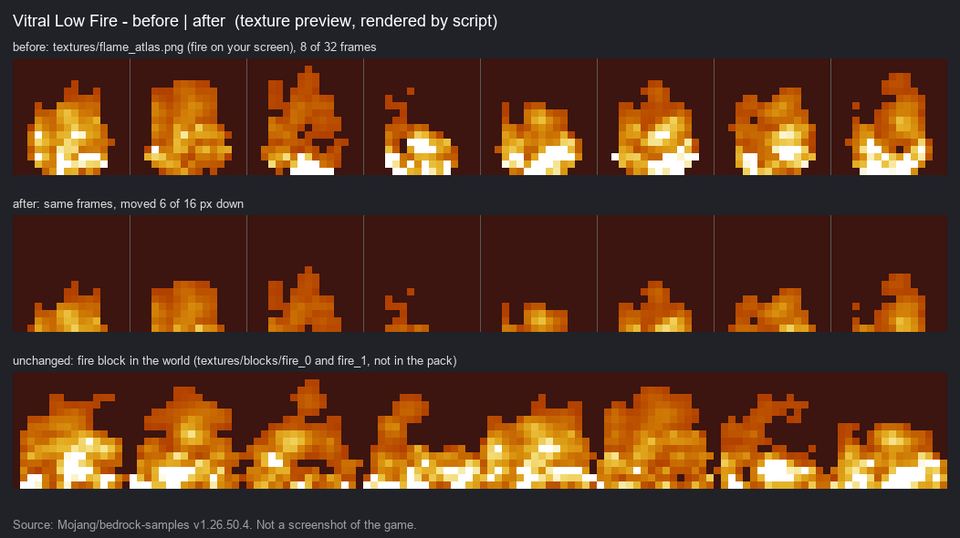
What it does
- The flames at the bottom of your screen are about 40% shorter.
- Fire blocks in the world stay vanilla: forests, Nether fire, soul fire, campfires.
- Mobs on fire also show the lower flames.
- One texture, nothing else changes. Texture pack only.
Versions and loaders tested
We list only what we opened ourselves, version by version. The store page may list more once it has been checked.
| Minecraft | Loader | How we tested it |
|---|---|---|
| 1.26.52 | Bedrock | Loaded on the official Bedrock Dedicated Server 1.26.52 with no errors. Not yet seen on a screen |
Requires: Minecraft Bedrock 26.50 or newer.
How to install
- Open the CurseForge page and download the file (the download happens there).
- Phone: open the file with Minecraft. Windows: double-click it. Minecraft imports it.
- Create or edit a world, go to Behavior Packs (add-ons) or Resource Packs (texture packs) and activate it.
Questions
When is it coming out?
After we see it on a real screen: the screen fire must drop and the world fire must stay the same.
Vitral Low Fire
Lower fire on screen, so you can see while burning. Texture pack only.
coming soon